
Screenshots



About Installer - Install APK
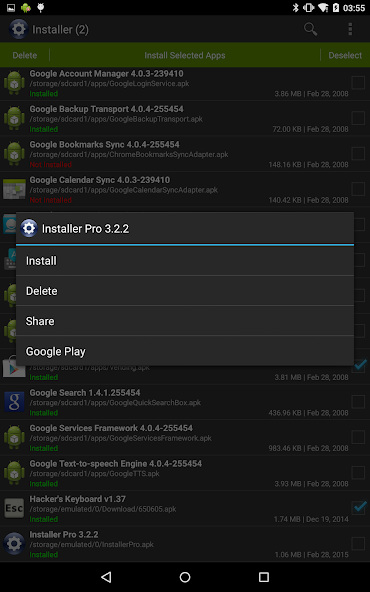
Full featured installer with tiny size, user friendly design and high performance. Scan and install market and non-market apps easily from your SD card.
Features:
- Install and delete applications from SD card.
- Auto-scan all APK files from SD card. Use built-in cache mechanism to improve performance, avoid scan over and over again.
- Support batch mode for multiple APK install and delete.
- Show full application information including name, version, path, size and date.
- Instantly search applications by name.
- Share application to friends through multiple ways such as Gmail, Bluetooth, etc.
- Search application information directly from android market.
- Show installation status of each APK file:
- Installed: This APK application has been installed on your device.
- Update: This APK application version is newer than current one on your device.
- Not Installed: This APK application has not been installed on your device.
Usage Guide:
This application is very straight forward. For first launch it will search all APK files which stored on your SD card and display them for you to install. For other launches it will load application information automatically from cache to save plenty of time. Click refresh button in option menu to rebuild the cache if SD card content changed when necessary.
Any comment is welcomed and appreciated, please send to support@rhmsoft.com.
Enjoy it.
Information
View on Google PlayFrequently Asked Questions
Is Installer - Install APK free to download?
Installer - Install APK is free to download from Google Play Store.
Is Installer - Install APK safe to download?
Yes, we provide direct download links from the official Google Play Store, ensuring a safe and verified download.
Compare Installer - Install APK
Similar Apps
See All